For developers
DIY Stubs API
Overview
The API lets you fetch your events and tiers, list sold tickets, and start a checkout session that returns a Stripe URL, so you can put a "Buy tickets" button anywhere.
- The API comes with Pro ($12.99/mo or $129/yr).
- JSON over HTTPS, no SDK required.
- Authenticate with a bearer API key you create in your dashboard.
- Keys are either account-wide or scoped to a single event.
- Rate limit: 60 requests / minute / key.
Authentication
Create a key from Dashboard → Developers → New key. The full key is shown once at creation, copy it to a safe place. We only store a hash.
Pass it on every request:
Authorization: Bearer ds_live_XXXXXXXXXXXXXXXXXXXXXXXXXXXXXXXXKey scopes
- Account-wide: can read and act on any of your events.
- Single event: locked to one event. Safer if you're embedding on a specific event page or sharing the key with a third party.
Rate limits
60 requests per minute per key. If you exceed the limit you'll get an HTTP 429 with:
{
  "error": {
    "code": "rate_limited",
    "message": "Rate limit exceeded (60 requests/min)"
  }
}
Errors
All errors share the same envelope:
{ "error": { "code": "<code>", "message": "<human readable>" } }401 missing_auth / invalid_key: missing, malformed, revoked, or expired key.403 wrong_scope: the key doesn't have access to the requested event.404 not_found: event or resource doesn't exist or isn't yours.400 validation_error: body or query failed validation.429 rate_limited: slow down.500 *: something blew up on our end. Retry after a beat.
Endpoints
GET /api-v1-events
Lists every event on your account. (If the key is event-scoped, returns just that event in single-event format below.)
curl https://rrmrikamluvajuafldfx.supabase.co/functions/v1/api-v1-events \
  -H "Authorization: Bearer ds_live_..."
{
"data": [
{
"id": "uuid",
"slug": "summer-fest",
"title": "Summer Fest",
"status": "published",
"venue_name": "The Garage",
"starts_at": "2026-07-04T20:00:00Z",
"ends_at": "2026-07-05T02:00:00Z",
"capacity": 300,
"created_at": "..."
}
]
}GET /api-v1-events?event_id=...
Returns one event with its tiers and remaining inventory.
{
  "data": {
    "id": "uuid",
    "slug": "summer-fest",
    "title": "Summer Fest",
    "description": "...",
    "status": "published",
    "venue_name": "The Garage",
    "venue_address": "123 Main St",
    "starts_at": "...", "ends_at": "...",
    "capacity": 300,
    "flyer_url": "https://...",
    "tiers": [
      { "id": "uuid", "name": "GA", "description": "Standing room", "price_cents": 2500, "quantity": 200, "sold": 47, "remaining": 153 },
      { "id": "uuid", "name": "VIP", "description": "Includes merch + early entry", "price_cents": 7500, "quantity": 50, "sold": 12, "remaining": 38 }
    ]
  }
}
GET /api-v1-tickets
List tickets across your account. Query params:
event_id: filter to one event (required if your key is event-scoped, applied automatically).scanned:trueorfalse.email: exact match on buyer email.limit(default 100, max 500),offsetfor pagination.
curl "https://rrmrikamluvajuafldfx.supabase.co/functions/v1/api-v1-tickets?event_id=UUID&scanned=false&limit=50" \
  -H "Authorization: Bearer ds_live_..."
{
"data": [
{
"id": "uuid",
"event_id": "uuid",
"tier_id": "uuid",
"order_id": "uuid",
"buyer_email": "fan@example.com",
"buyer_name": "Sam Fan",
"ticket_number": 1,
"quantity_in_order": 2,
"price_paid_cents": 2500,
"platform_fee_cents": 125,
"scanned": false,
"scanned_at": null,
"created_at": "..."
}
],
"meta": { "pagination": { "limit": 50, "offset": 0, "total": 87 } }
}Tickets sharing the same order_id are one purchase, group on your side if you want order-level views.
POST /api-v1-checkout
Creates a Stripe Checkout session and returns the URL to redirect the buyer to. Funds settle into your connected Stripe account just like a checkout started from DIY Stubs itself, same fees, same payouts.
curl -X POST https://rrmrikamluvajuafldfx.supabase.co/functions/v1/api-v1-checkout \
  -H "Authorization: Bearer ds_live_..." \
  -H "Content-Type: application/json" \
  -d '{
    "event_id": "uuid",
    "items": [
      { "tier_id": "uuid", "quantity": 2 }
    ],
    "buyer_email": "fan@example.com",
    "buyer_name": "Sam Fan",
    "email_opt_in": true
  }'
{
"data": {
"checkout_url": "https://checkout.stripe.com/c/pay/cs_...",
"session_id": "cs_test_..."
}
}Redirect the buyer to checkout_url. After payment, Stripe redirects to the event's success page (/e/<slug>/success) by default, that's where they get their ticket email and QR codes.
GET /api-v1-public-availability
Lightweight, public (no auth), CDN-cached endpoint for "X tickets left" badges and custom buy widgets. Returns capacity / sold / reserved / remaining per tier. Cached for 10 seconds at the edge, so safe to call from the browser at scale.
curl "https://rrmrikamluvajuafldfx.supabase.co/functions/v1/api-v1-public-availability?event_id=YOUR_EVENT_ID"
# or
curl "https://rrmrikamluvajuafldfx.supabase.co/functions/v1/api-v1-public-availability?slug=summer-fest"
{
"data": {
"event_id": "uuid",
"tiers": [
{
"tier_id": "uuid",
"capacity": 200,
"sold": 142,
"reserved": 3,
"remaining": 55,
"on_sale": true
}
]
}
}Embedding a buy button
Two ways to embed: the drop‑in widget (two lines of HTML, no backend) or the server-side pattern (your server hits /api-v1-checkout and redirects).
Drop‑in widget
Paste this anywhere on your site:
<div data-diystubs-event="YOUR_EVENT_ID_OR_SLUG"></div>
<script async src="https://diystubs.com/embed.js"></script>
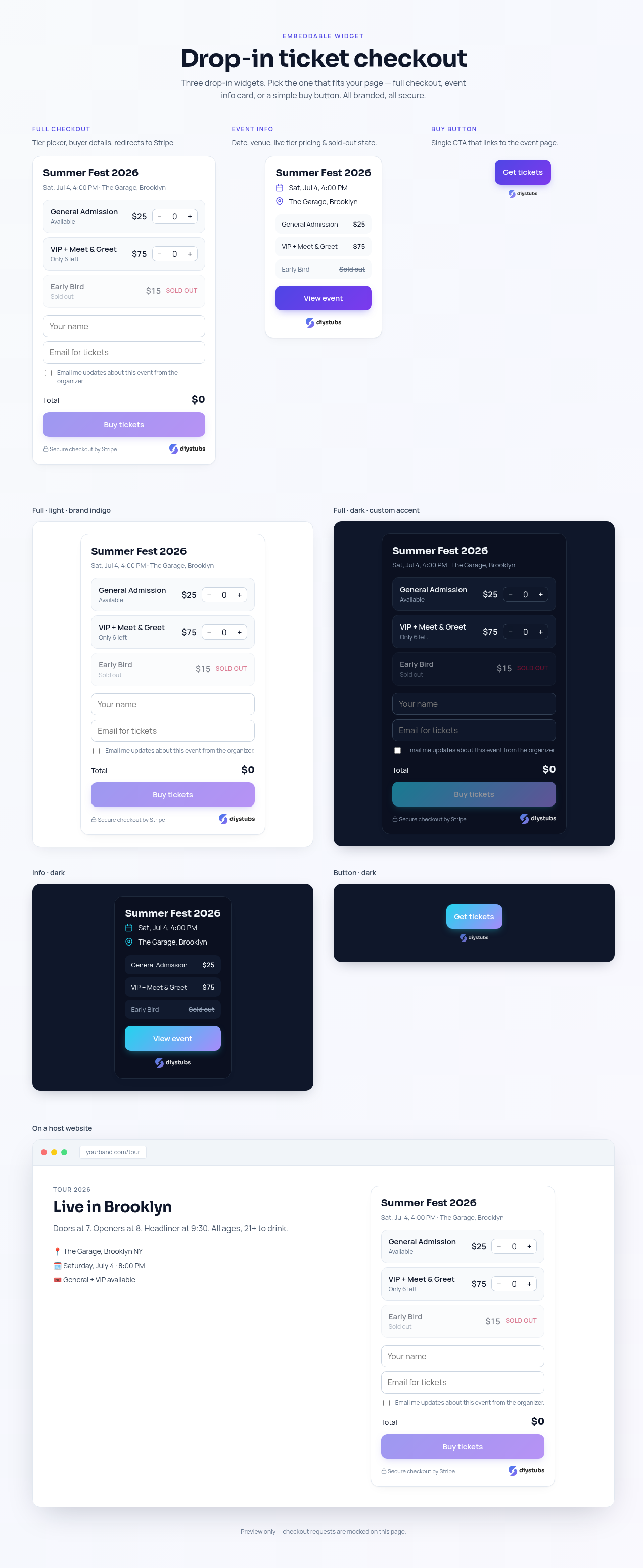
The widget renders inside a Shadow DOM (no CSS leakage), supports light/dark themes and custom accent colors, and ends at Stripe Checkout for payment. Three variants are available: full (default), info, and button.
Variants
Full checkout: tier picker plus buyer details. It collects the order on your page, then hands the buyer to the event page on diystubs.com, which starts Stripe Checkout. Works on any domain, no allowlist needed.
<div data-diystubs-event="EVENT_ID" data-diystubs-variant="full"></div>Event info: date, venue, live pricing and sold‑out state, with a "View event" CTA.
<div data-diystubs-event="EVENT_ID" data-diystubs-variant="info"></div>Buy button: a single branded CTA that links to your event page.
<div
  data-diystubs-event="EVENT_ID"
  data-diystubs-variant="button"
  data-diystubs-label="Get tickets"
></div>
All attributes
data-diystubs-event: event ID or slug (required).data-diystubs-variant:full·info·button.data-diystubs-theme:light·dark·auto.data-diystubs-accent/data-diystubs-accent-2: gradient hex colors.data-diystubs-success-url/data-diystubs-cancel-url: post-checkout redirects. Leave them out and the buyer lands on the DIY Stubs confirmation page with their tickets; set them to bring the buyer back to your site instead.data-diystubs-label: button variant CTA text.
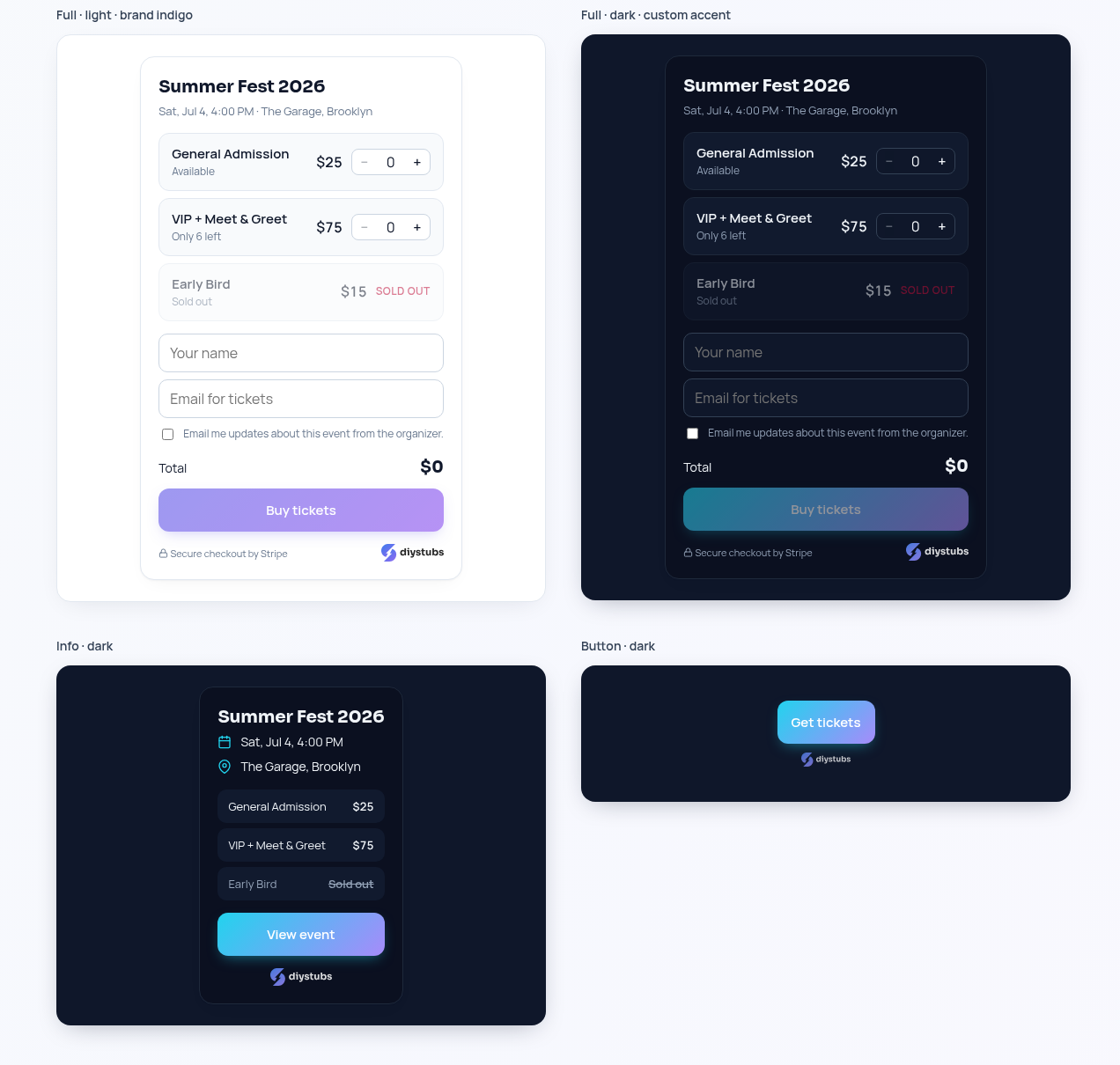
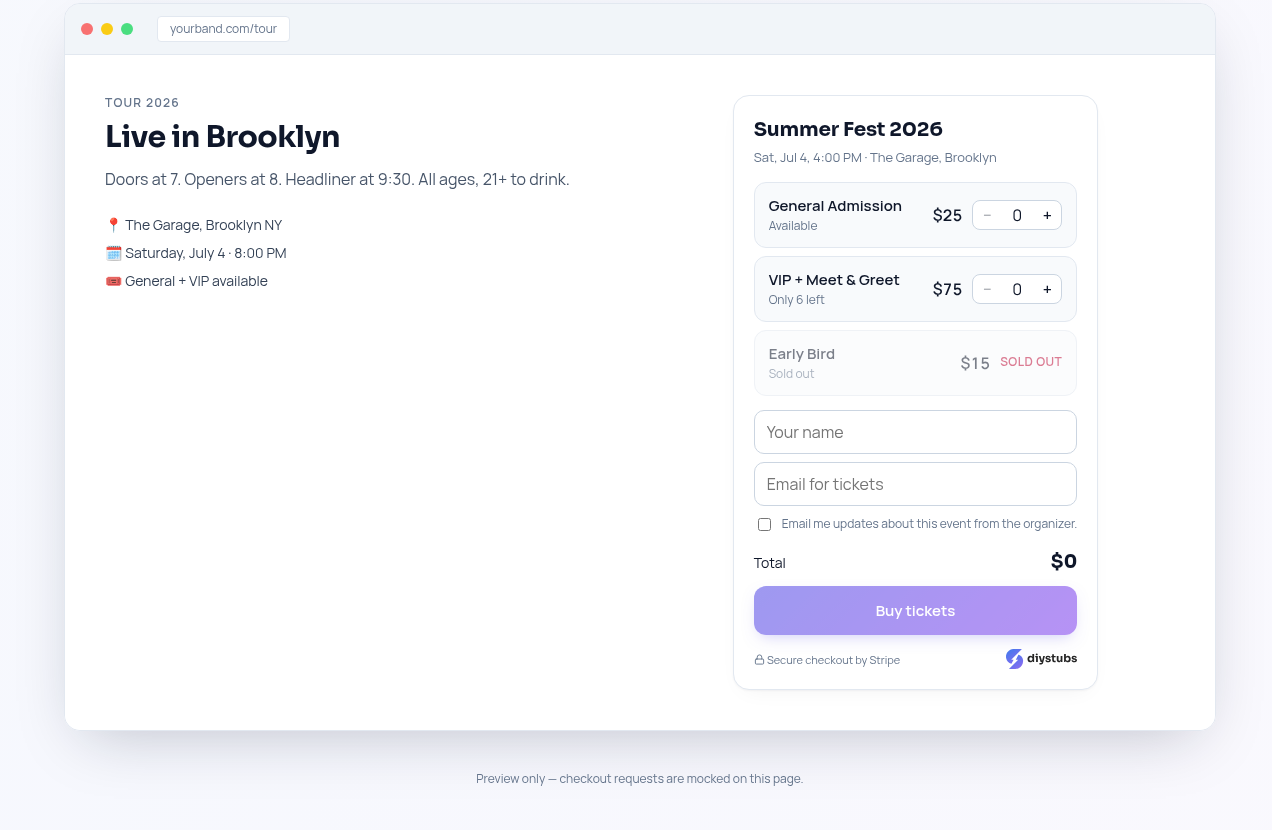
See it live at /preview/embed. The widget itself needs no configuration on our side: paste it on any domain and it works.
Server-side redirect
For full control: on click, your server creates a checkout session and redirects.
// server-side (Node/Express style)
app.post("/buy", async (req, res) => {
  const r = await fetch("https://rrmrikamluvajuafldfx.supabase.co/functions/v1/api-v1-checkout", {
    method: "POST",
    headers: {
      "Authorization": "Bearer " + process.env.DIYSTUBS_API_KEY,
      "Content-Type": "application/json",
    },
    body: JSON.stringify({
      event_id: "your-event-uuid",
      items: [{ tier_id: req.body.tier_id, quantity: req.body.qty }],
    }),
  });
  const { data, error } = await r.json();
  if (error) return res.status(400).json(error);
  res.redirect(303, data.checkout_url);
});
Webhooks
Subscribe an HTTPS endpoint to receive real-time JSON events when something happens on your account. Create endpoints from Dashboard → Developers → Webhooks. Each endpoint can be scoped to all your events or a single one.
Event types
ticket.sold: fired when a Stripe payment succeeds and tickets are issued. Payload includes the order, buyer, and array of tickets.ticket.scanned: fired when a ticket is redeemed at the door.event.cancelled: fired when the organizer cancels an event.
Payload shape
Every delivery is a JSON envelope with a unique id, the event type, a unix created timestamp, and a data object specific to the event:
POST https://yourapp.com/webhooks/diystubs
Content-Type: application/json
DIYStubs-Signature: t=1716210000,v1=8d7c…
User-Agent: DIYStubs-Webhooks/1.0

{
  "id": "uuid",
  "type": "ticket.sold",
  "created": 1716210000,
  "data": {
    "event_id": "uuid",
    "order_id": "uuid",
    "event": { "id": "uuid", "title": "Basement Show", "slug": "basement-show" },
    "buyer": { "email": "fan@example.com", "name": "Sam Fan" },
    "quantity": 2,
    "gross_cents": 5000,
    "platform_fee_cents": 150,
    "net_cents": 4850,
    "tier_name": "GA",
    "tickets": [
      { "ticket_number": 1, "qr_code": "uuid", "tier_id": "uuid", "tier_name": "GA", "price_paid_cents": 2500 },
      { "ticket_number": 2, "qr_code": "uuid", "tier_id": "uuid", "tier_name": "GA", "price_paid_cents": 2500 }
    ]
  }
}
Verifying signatures
Each request includes a DIYStubs-Signature header in the form t=<unix>,v1=<hex> where v1 is an HMAC-SHA256 over `${t}.${rawBody}` using your signing secret. Reject any request whose signature doesn't match, or whose timestamp is more than 5 minutes old.
// Node example
import crypto from "node:crypto";

app.post("/webhooks/diystubs", express.raw({ type: "application/json" }), (req, res) => {
  const header = req.headers["diystubs-signature"] || "";
  const parts = Object.fromEntries(header.split(",").map(p => p.split("=")));
  const expected = crypto
    .createHmac("sha256", process.env.DIYSTUBS_WEBHOOK_SECRET)
    .update(`${parts.t}.${req.body.toString()}`)
    .digest("hex");
  if (expected !== parts.v1) return res.status(400).send("bad signature");
  if (Math.abs(Date.now() / 1000 - Number(parts.t)) > 300) return res.status(400).send("stale");

  const evt = JSON.parse(req.body.toString());
  // handle evt.type ...
  res.sendStatus(200);
});
Delivery
- Respond with any 2xx to acknowledge. Keep the handler fast: acknowledge first, then do slow work in the background.
- Each event is sent once. There are no automatic retries today: if your endpoint is down, times out, or returns a non-2xx, that delivery is recorded as failed and is not sent again.
- The last delivery time and HTTP status are shown next to each endpoint in the dashboard (
0means the request never got a response). - Because a delivery can be missed, treat webhooks as a fast signal and reconcile with the API (for example
GET /api-v1-tickets) if you need a complete record. - Use the test ping button to send a
pingevent to your URL without waiting for a real one. - Rotating the signing secret invalidates the old one immediately.
Changelog
- v1.1: public availability endpoint, outbound webhooks (ticket.sold / ticket.scanned / event.cancelled), embeddable widget variants.
- v1.0: public read endpoints + checkout creation.
Ready to build? Create a key from Dashboard → Developers.